
Search for a Reward Certificate Code
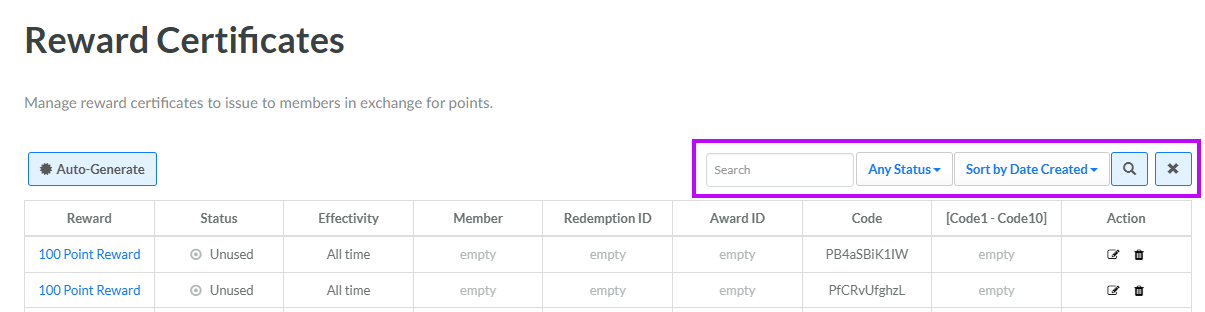
The search feature on the Reward Certificates screen allows you to search for a specified text string anywhere within the name of the associated Reward, the code value, or the coupon URL. You can also filter the Reward Certificates screen to show only certificate codes with a specified status.
To search for a Reward Certificate Code:
-
Select Rewards from the top navigation bar, then select Rewards > Reward Certificates from the side navigation menu. The Reward Certificates screen is displayed.
-
Optionally, in the Search field, enter the desired text string.
-
Optionally, from the Status drop-down menu, select a Certificate Code status value. The default is Any Status.
-
Click the Search icon. The screen is refreshed to show only the Certificate Codes that meet your search criteria. If you entered multiple search criteria, the Certificate Code must meet ALL criteria.
-
To sort the search results, select the desired sort order from the Sort By drop-down menu. The default sort order is by: Date Created.
-
Optionally, to remove all search criteria and revert to the default criteria, click the Clear icon.
For each Reward certificate code, the platform displays the Reward to which the code is associated, its status and effectivity period, the Member to whom the certificate code has been assigned (if applicable), the ID of the Redemption or Award (if applicable), and the value of the code itself. Once you have found the desired Reward certificate code, you can view the following detailed information:
-
Within the Member column, click the Member's name to view the Member Details screen. See Member Details for more information.
-
Within the Reward column, click the Reward name to view the Reward Details screen. See View a Reward for more information.
-
Within the Redemption ID column, click the value to view the Redemptions screen. See Getting Started with Redemptions for more information.
-
Within the Award ID column, click the value to view the Awards screen. See Getting Started with Awards for more information.
